InsideView users will be able to validate Direct Dial Phones for contacts.
InsideView is adding Direct Dials to its Sales product. The lack of direct dials is a long-standing gap in its service as competitors have provided these numbers for several years. InsideView for CRM supports uploading and syncing of direct dials.
The new field is currently in beta. InsideView expects to have around two million direct dials in its service by the end of this quarter and is targeting ten million by the end of the year. The majority of the direct dials will be for US execs and mid-level managers.
InsideView currently provides 32 million global contacts with 15 million emails. The contacts span 14 million companies.
InsideView also announced Salesforce encryption support for adding and updating Account, Contact, and Lead records. The firm provided the following caveat, “If you are using deterministic encryption, InsideView will attempt to find existing duplicates as part of the ‘Update CRM” data sync/export. If you are using probabilistic encryption, InsideView won’t be able to query Salesforce for potential duplicates in Salesforce, but your users can still use the “Update CRM” feature.
The Drift SNAP partnership provides LinkedIn intelligence to sales reps as they chat with prospects on the Drift platform.
As part of their Q1 2019 release, LinkedIn rolled out a set of new SNAP (Sales Navigator Application Platform) partners including Altify, Drift, G2 Crowd, and Mixmax.
The Drift partnership allows sales reps to “continue website conversations” after a prospect drops off of a Drift chat: “sometimes people leave your conversation abruptly – it happens. But as an SDR, that’s a potential meeting walking out the door. So what do you do? Well now you can send a connection request or follow up message with InMail right from within Drift.”
The Drift
integration also displays contact and company intelligence including shared
connections while a sales rep is chatting with a prospect visiting her website
(see image on right).
“Gone are
the days of toggling back and forth between LinkedIn and your ongoing sales
conversation,” said Drift Product Marketer Daniel Murphy. “Say goodbye to
awkward lags in conversations. Prospects will never again have to wait for a
response while SDRs search LinkedIn Sales Navigator or Salesforce to determine
if they’re a good fit. Now they can research a prospect’s company, see
mutual connections, and grab other insights and conversation starters – all in
real-time.”
G2 Crowd
gathers intent data from 24 million technology searchers. Intent data is
collected from G2 profile and category views along with competitor comparisons.
Sales reps are notified when followed accounts are researching on G2
based on contact connections, sales preferences, search histories, and profile
interactions.
“People don’t buy today as a result of cold calls and emails. The power is in the hands of the buyers doing more research than ever before. As sales teams, we need to focus on accepting the modern buyer journey and connecting to the right buyers at the right time. We’ve always been aligned with LinkedIn on this vision, and this integration helps us make it a reality.”
G2 Chief Revenue Officer Matt Gorniak
The Mixmax
SNAP integration supports InMail and Connection requests and profile views from
Gmail.
Altify’s
org-chart software now displays insights and helps users identify key buyers
across an organization.
Sales Navigator insights and functionality are displayed alongside Altify’s Relationship Maps.
LinkedIn
also noted that it will be available within the Salesforce Winter 2019 release.
Salesforce admins can install the application from the Lightning Setup
Console instead of the AppExchange.
One problem that
has long dogged sales intelligence vendors is ongoing training and product
exploration. To encourage exploration, Sales Navigator added a coaching
feature to extend product knowledge. Sales Navigator Coach is a new
dashboard that “suggests actions for customers to take and links to short
learning videos.” Actions are associated with core workflows. The
videos run thirty to forty seconds.
The new Sales Navigator Coach provides short videos and tips on key features.
Finally, GDPR opt-outs are being added to PointDrive presentations. PointDrive recipients will be able to revoke viewer tracking permission, effectively anonymizing their viewing data from sales reps.
LinkedIn Sales Navigator rolled out Custom Account and Lead Lists in Q4 and added List Sharing in Q1 2019.
LinkedIn Sales Navigator began rolling out its Q1 release two weeks ago. New features include custom list sharing, Sales Navigator Coach, list building exclusion filters, new Sales Navigator Application Platform (SNAP) integrations, and an expanded set of technologies selects.
LinkedIn
Sales Solutions VP of Product Management Doug Camplejohn was most excited about
custom list sharing, noting that that “selling is a team sport.”
Team members
can share lists with other users on their contracts, share comments, and sort
by “Last Updated” date so sales reps can stay apprised of updated leads and
accounts. Sales Navigator notifies users when lists are being shared with
them. However, lists reside only in LinkedIn and are not downloadable.
“Now we’re taking lists up a notch by adding the ability for you to share these custom lists between your team members and have comments shared as well. Sales Development Reps can collaborate with Account Executives on their team and share progress on breaking into new accounts. Relationship Managers and Customer Success Representatives can collaborate around the health of their named accounts throughout the customer lifecycle. And Marketing can easily share lists from events with the teams following up on new leads. The possibilities are endless.”
Doug Camplejohn, VP of Product Management, LinkedIn Sales Solutions
LinkedIn has
long described Sales Navigator as a system of engagement that worked with
systems of record (CRM) and communication (email, social). Much of the
initial focus was on lead messaging and SNAP connectors, but the firm is now
placing a greater focus on teamwork. Shared lead lists are “the first
step in a broader strategy to enable collaboration across your selling teams,”
wrote the firm.
Lead lists were released in Q4 and quickly employed by users. 250,000 custom lists were created within the first six weeks of availability. A quarter of active users created custom lists post-launch.
Users can
also save Leads and Accounts to custom Lists from partner applications via
their broad set of SNAP partners.
LinkedIn
stated that “sharing increases visibility of and fosters collaboration for your
pipeline.” Custom lists help teams organize and plan for key leads and
accounts within lists: “Sharing allows them to collaborate with others as they
research, contact, and advance relationships with those Leads and Accounts.”
Users can
track team outreach to prospects, share leads with managers to discuss
strategy, segment by source, and customize follow-on activities.
Other screening enhancements include the expansion of technology selects to 30,000 technologies and the addition of seven categories of exclusion criteria for leads: company, geography, seniority level, title, function, industry and school. Account exclusions are provided for geography and industry. Camplejohn noted that exclusion filters were one of the top user requests.
Part II covers SNAP partners, SFDC Lightning Setup Console integration, and the new Sales Navigator Coach
Sales Navigator now supports custom Account and Lead lists.
LinkedIn rolled out its Q4 Sales Navigator release in November, but I failed to blog about it. (Q1 will be covered next week in this blog.) The release contains several nascent initiatives including custom lists and the collection of “Reports To” data to assist with organizational mapping. Other feature sets include three new alerts, an improved accounts center, PointDrive activity logging, and additional SNAP connectors.
LinkedIn is
beginning to collect data around who reports to whom. As sales reps or
others learn about reporting relationships, they can add them to executive
profiles. The data is then shared across the LinkedIn contract with
co-workers but not more broadly. Following after last quarter’s support
of buying committees, it is evident that LinkedIn is looking to infuse
additional project and reporting relationships within Sales Navigator.
“We’re
laying the foundation for full-blown org charts by adding a new “Reports To” field
on the Lead Page,” blogged Head of Products for LinkedIn Sales Solutions Doug
Camplejohn. “Once you learn who someone’s manager is, you can add that
info to their page by searching for a name or browsing our recommendations. Any
additions you or your colleagues make will only appear to those in your
company’s Sales Navigator contract. So, the next time you or a team member
looks that lead up, you’ll see who they report to, who added that connection,
and a reporting history.”
An unlimited
number of custom lists of accounts or leads may be built within the LinkedIn
desktop or mobile app. Users may post notes on saved leads or accounts and
filter the lists by people who have changed jobs in the last 90 days, people
who have posted on LinkedIn in the past 30 days, companies who have had senior
leadership changes in the past 3 months, etc.
LinkedIn does not yet support custom list uploading. Custom Sharing is part of the Q1 release.
LinkedIn Sales Navigator added three new alerts
LinkedIn added three new alerts:
Someone at a saved account viewed your profile
A saved account has just raised funding
A saved lead has engaged with LinkedIn posts from your company
which
accompany six current alerts:
A saved lead started a position at a new company
A saved lead has a new position within the same company
A saved lead viewed your profile
A potential lead recently joined a saved account
A saved lead has accepted your connection request
A saved lead was mentioned in the news
Alerts are
now included in the main menu bar of both the desktop and mobile editions. Camplejohn
noted that LinkedIn has improved the “signal-to-noise ratio” of its alerts.
“Think of
our Alerts as a trusted sales advisor tapping you on the shoulder with
information about your saved leads and accounts when it’s most important and
relevant to you,” said Camplejohn.
LinkedIn has
simplified its admin experience and “made it much easier to do tasks from
assigning users to managing groups.” LinkedIn also unified its
administration module across Sales Navigator, LinkedIn Learning, and LinkedIn
Recruiter.
Advanced
Searching was added to the Sales Navigator mobile app, bringing it to list
building parity with the desktop application. Earlier this year, LinkedIn
enhanced its company and lead profiles, also bringing them to parity with the
desktop application.
“LinkedIn’s recent updates to its Sales Navigator management tool makes it a more robust platform for sales teams. More importantly, the moves to bring more of its desktop features to the mobile app are evidence that LinkedIn finally understands how crucial a mobile experience is when designing a sales tool focused on lead management.”
Amy Gesenhues, MarTech Today
PointDrive,
Sales Navigator’s multi-media sharing application, will begin writing activity
history back to Microsoft Dynamics. Salesforce PointDrive sync will come
in 2019. PointDrive presents documents and video to end users as a
landing page and tracks views and shares.
“Now when
you send that pricing proposal to a prospect in PointDrive and members of the
buying committee engage with it, you’ll be able to see that activity in both
Sales Navigator and your CRM,” blogged Camplejohn.
LinkedIn continues
to expand its SNAP
partnerships, adding Zoom as their first
web conferencing partner. Users can now hover over an attendee name and
view Sales Navigator intelligence including their profile photo, title, and
common connections.
The Zoom LinkedIn SNAP integration provides meeting attendee insights and connections from within Zoom.
Four vendors
launched v2 SNAP integrations which provide broader access to Sales Navigator
actions:
In the
Salesforce Winter Lightning release, admins will be able to configure Sales
Navigator and add support for Person accounts without having to go to the
AppExchange.
This year, Sales Navigator focused on improved functionality and display for accounts, leads, and list building in their mobile and desktop applications; SNAP integrations; GDPR compliance and security; CRM opportunity management and buyers circles; alerting; employment analytics; and PointDrive CRM integration. Details on earlier releases are available in my blog: Q1, Q2, Q3.
Owler promises 60 second access to the platform with one-click Salesforce permissioning.
Sales and competitive intelligence vendor Owler is readying to launch Owler Pro, its first end-user premium service. Pro reads the open Leads, Accounts, and Opportunities in Salesforce and begins delivering automated alerts to sales reps. Owler Pro supports single-click sign-on so no Salesforce admin support is required. The service is currently in beta test and includes a redesign of their Instant Insights email alert design.
“In short, it’s an ad-free, streamlined way for Saleforce.com users to automatically sync their active opportunities with Owler, and auto-follow those companies on Owler. So, a sales person’s Daily Snapshot will always be relevant to the deals they are currently working on.”
Owler CEO Tim Harsch
The service is designed for sales reps, but Owler plans to support competitive intelligence analysts, marketing professionals, and senior level executives in the future.
Owler Pro,
which is expected to launch in mid to late February, is priced at $12.99 per
month or $119.88 annually. During the beta, users receive one free month,
but they are undecided on whether that offer will continue following general
user rollout.
The premium
service also alerts on a broader set of topics. While the free version
focuses on M&A activity, funding events, and exec changes, the Pro edition
adds an additional dozen triggers:
Product Launches
Joint Ventures
Partnerships
Awards
New Offices
IPO Announcements (a precursor to the closing of the actual funding)
Record Earnings
Earnings Announcements
Restructuring
Key Employee Departures
Key Employee Hires (in addition to primary leadership which are included in the free version)
Layoffs
According
Harsch, the goal is to “arm sales reps with sales triggers.”
Owler also
recently rolled out a Lightning Data solution which performs a monthly match
and append against Salesforce Accounts. 36 fields are supported including
the top three competitors and social media links. The service is priced
at $25 per user per month for all users in the instance.
The
Lightning Data solution includes a free self-assessment report which analyzes
Owler’s match and append rate against Salesforce Accounts and includes segmentation
data.
Owler has 2
½ million active users, up from 1.1 million a year ago. Nearly half of
users are located in the Sales or Marketing department and forty percent are
directors or above. An additional 17% describe themselves as Analysts,
Consultants, or Specialists.
Owler user base demographics
Owler is also available through its API partners including CrunchBase, SalesLoft, SugarCRM, and Salesforce Lightning Data.
Owler
collects data on over 11 million companies including four million full
profiles.
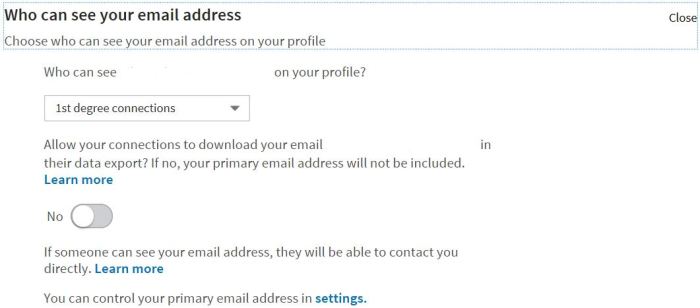
LinkedIn users can block connections from downloading their emails.
LinkedIn added the option to restrict downloading of emails by their connections. LinkedIn does not generally allow profile downloading or CRM synching except for permissioned connections. Users now have the option to permit connections to view their emails but block them from downloading emails. By default, emails are not downloadable unless users change their settings to permit downloads.
While the change is pro-privacy and consistent with GDPR, TechCrunch took a negative view of the new setting.
A win for privacy on LinkedIn could be a big loss for businesses, recruiters and anyone else expecting to be able to export the email addresses of their connections.…[The new option] could prevent some spam, and protect users who didn’t realize anyone who they’re connected to could download their email address into a giant spreadsheet. But the launch of this new setting without warning or even a formal announcement could piss off users who’d invested tons of time into the professional networking site in hopes of contacting their connections outside of it…
On a social network like Facebook, barring email exports makes more sense. But on LinkedIn’s professional network, where people are purposefully connecting with those they don’t know, and where exporting has always been allowed, making the change silently seems surreptitious. Perhaps LinkedIn didn’t want to bring attention to the fact it was allowing your email address to be slurped up by anyone you’re connected with, given the current media climate of intense scrutiny regarding privacy in social tech. But trying to hide a change that’s massively impactful to businesses that rely on LinkedIn could erode the trust of its core users.
Josh Constine,TechCrunch
TechCrunch overstates the loss. Member control their data, not LinkedIn or LinkedIn connections. Second, there are multiple ways to reach users from within LinkedIn including InMail, messaging, and PointDrive. Unless the email is blocked on the profile, connections still have access to emails from within LinkedIn. Finally, most emails in LinkedIn are personal emails, not business emails (an issue they should address by allowing both and setting privacy and messaging rules around multiple emails), so reaching out to individuals on their emails only makes sense for friends, family, and recruiters on LinkedIn, not businesspeople networking with colleagues and clients.
While LinkedIn wasn’t transparent about the privacy change, it enhanced the privacy of its members. As such, looking for nefarious reasons for the enhancement is a reach.
Last month Sales Navigator began rolling out its Q3 release. Amongst the features are a Pipeline Review and Buyers Circle (discussed last Friday), improved Search, and additional SNAP integrations.
Sales Navigator Account and Lead Search have been redesigned for speed and ease. The Account and Lead Search functions and results (see 1 below) are more prominent, offer streamlined search filters (see 2), and deliver simplified save search and alerting processes. Other enhancements include hover cards (see 3) which display company intelligence when mousing over a company name. Hover cards include a Save as Account button.
Improved Searching includes an improved navigation (1), redesigned filters (2), and account hover cards (3).
LinkedIn originally designed their mobile app to complement the desktop service but is working to make mobile a “full-featured Sales Navigator experience.” Last quarter, they focused on Account enhancements and this quarter they brought the mobile Lead experience to parity with the desktop service.
“We will continue to narrow the gap between our mobile and desktop experiences in upcoming releases, and take advantage of the unique characteristics of mobile as well.”
Doug Camplejohn, VP of Product Management at LinkedIn Sales Solutions.
LinkedIn continues to invest in its SNAP partner program. This quarter, Adobe Sign was added as a partner and three partners (Salesforce, MS Dynamics, and SalesLoft) took advantage of their version two capabilities. SFDC and MSD now broadly embed LinkedIn intelligence in Lead, Account, and Opportunity pages. Users may also send InMails from within the CRM.
The next generation SNAP integrations are modular, providing greater flexibility around where content is displayed. New modular features include InMail support and the handling of Potential Profile Matches.
New SNAP modular elements from within Microsoft Dynamics.
LinkedIn has taken a “Switzerland approach” to its partnerships, working with both Microsoft and its competitors.
The firm reiterated its commitment to data security and GDPR compliance. “LinkedIn maintains ISO 27001 & ISO 27018 certifications, as well as a SSAE-18 certification, SOC 2 Type I report,” noted the firm in its briefing to Admins.
Finally, LinkedIn added an Ideas site to its Sales Navigator Community portal where admins can “submit, vote on, comment on and track status of ideas for how to improve Sales Navigator.”
Buyer Circle, a new Sales Navigator feature released in Q3, provides drag-and-drop functionality for defining purchasing roles and players.
Last month, LinkedIn rolled out its Q3 Sales Navigator release to admins and trainers. Enhancements include a new Deals feature to assist with pipeline reviews, “Buyer Circles,” an updated search user experience, and revised mobile lead pages. Several partner platforms are also rolling out version 2 of their SNAP integrations.
During pipeline reviews, “managers are really trying to find out what are areas of weakness in the pipeline and how they can help. A lot of times, because the information that’s been put into CRM is incomplete, that can be a challenging conversation,” says Doug Camplejohn, VP of Product Management at LinkedIn Sales Solutions. “The problem Deals is ultimately trying to solve is how do you increase the quality of that data that is ultimately stored in the CRM, and by making it much easier for the rep to quickly see missing points of information as well as to add in what one could argue is the most important information—who are all the people that are involved in that buying decision at the target company.”
LinkedIn noted that pipeline review sessions are often frustrating due to incomplete and out of date CRM information resulting in a “20 questions” session in search of deal risks. The new Deal feature pulls deal and contact intelligence from the CRM and streamlines the update process. Instead of jumping between opportunity records, reps can manage their pipeline updates from a single pane of glass. The update table allows reps to quickly enter deal intelligence including deal size, stage, close date, and next steps with information immediately written back to the CRM.
Deals requires that the Salesforce Admin enable CRM synch. Reps will only be able to view and edit fields for which they have been granted permission and only for Opportunities in their name. Managers will only be able to view Deals for their team members.
Deals includes a Buyer’s Circle feature which helps reps quickly fill gaps in their Buying Committee. “The real power comes when you want to add missing role contacts,” Doug Camplejohn, LinkedIn Sales Solutions VP Products wrote to licensors. “Buyer’s Circle makes it easy to select anyone on LinkedIn and drag them to a role, which, again, automatically updates your CRM. And if that contact is not already in your CRM, Deals lets you create a new CRM contact associated with that opportunity in just a few clicks.”
As LinkedIn does not deliver member-specific details to third-parties, Buyers Circle only uploads First and Last Name, Title, and Company. Other buyer details would need to be keyed in by the sales rep or populated by a third-party enrichment vendor.
Deals is available in Salesforce.com with the Q3 release and will be available in Microsoft Dynamics in Q4.
The new Deals feature provides a tabular view of opportunities for rapid update and sharing with managers.
Deals is part of the Team and Enterprise editions and is based on a Heighten capability “rebuilt from the ground up.” Heighten was acquired in 2017.
“B2B selling is more complicated these days where you often have half a dozen people involved, but they’re not all recognized. A sales rep will put a single contact into the system, and if the deal goes sideways it’s hard to figure out who to contact or how to move forward.”
Doug Camplejohn, VP of Product Management, LinkedIn Sales Solutions
“I think the Deals module is the most interesting part of this release because it offers the biggest benefit,” said Gartner analyst Todd Berkowitz. “If you are in a market like tech or manufacturing or a complicated services deal, the number of people involved keeps going up including those who can influence the deal or an assassin who can kill it. The more information you can provide about all the people involved in the deal, the better. And the way the Buyers Circle surfaces information on people and brings it forward with one click is a real benefit.”
Part II covering additional features such as new SNAP integrations and mobile Lead profiles will publish on Monday.
LinkedIn continues to grow its global membership base at an impressive clip. The firm reached 500 million members sixteen months ago and has added nearly 15 million members per quarter since then, recently reaching 575 million.
North America continues as their most important market with over 150 million members in the United States, 15 million in Canada, and 12M in Mexico.
AsiaPac is also growing strongly with India recently hitting the 50 million member mark and China poised to soon pass the mark (42 million members). China was slower to develop but has grown rapidly since a localized version was launched a few years ago.
In Europe, there are at least 14 countries with one million members or greater. The United Kingdom is the third largest anglophone market with 25 million members. France (16M), Italy (12M), Spain (10M), and Benelux (10M) all represent strong markets.
LinkedIn is relatively underrepresented in the DACH region (Germany, Austria, Switzerland) as it continues to compete against German language professional network XING.
Other Anglophone markets include Australia (9M), South Africa (6M) The Philippines (6M), Nigeria (3M), Singapore (2M), Hong Kong (1M), New Zealand (1M), and Kenya (1M).
LinkedIn has also enjoyed success in Latin America with Brazil long being a significant market (34M). The firm also has a significant presence in Colombia (6M), Argentina (6M), and Chile (4M).
LinkedIn was barred from Russia several years ago.
Monthly active user figures are estimated at around 25% of members.
Membership, segment, and usage statistics for LinkedIn are less available since the firm was acquired by Microsoft in December 2016. Revenue, however, continues to accelerate, growing 37% to $1.464 billion in Q4 2018. Q4 marked the fifth-straight quarter of revenue acceleration.
“This strong engagement is driven by quality of the feed, video, messaging and acceleration of mobile usage, with mobile sessions up more than 55% year-over-year,” said Satya Nadella last month. “We will continue to invest to make LinkedIn the essential platform to connect the world’s professionals and help them achieve more with experiences powered by LinkedIn and Microsoft graphs.”
“We have united the world’s leading professional cloud with the world’s leading professional network and proved that we have an integration model that works, enabling LinkedIn to accelerate growth while retaining its member-first ethos,” continued Nadella.
Sigstr recently announced the launch of its new relationship marketing platform and Sigstr Pulse application. The new cloud offering analyzes email and calendar patterns to determine the strength of relationships between employees and prospects. Instead of determining engagement as clickthroughs and web visits, Sigstr Pulse determines relationship strength based upon employee interactions with prospects. Data is collected passively with sales reps not required to take any action.
According to Sigstr, “Revenue lags relationships. When you understand the quality of relationships, marketers can provide better air coverage and sales can forecast better.”
Sigstr calls out relationships between employees, accounts, contacts, and location; scores the strength of those relationships; assesses relationship strength over time; and helps identify warm introductions. As a relationship marketing platform, Sigstr visualizes the relationships with key accounts and determines “which contacts you know best and which you need to know better.”
Sigstr argues that corporate inboxes and calendars are the best source for measuring relationships. Relationships “live and grow in the inbox,” said Sigstr CEO Bryan Wade.
“Relationships are the lifeblood of every business, and no other system tracks who has relationships with whom better than a corporate email system. Sigstr Pulse allows marketers to effortlessly solve a problem everyone knows they have, making it easy to understand your organization’s complex web of relationships and take action on them. One practical example is in event marketing, as brands can send invitations to potential attendees based on the hierarchy of relationships within an organization,” said Wade. “Our platform is already in the email flow of hundreds of thousands of employees at some of the world’s largest brands, which means they can flip a switch to turn on relationship marketing via Sigstr Pulse. As we’re marketing in the era of GDPR, tapping into coworkers’ existing business relationships means less cold calling and more productive marketing.”
Sigstr Location Intelligence analyzes the strength of connections at the metro level.
Sigstr provides location-based intelligence to help identify where contacts are located. This intelligence assists with on-site meeting planning, territory assignment, and assessing relationship strength at the location level. Location-based intelligence can also be employed for event planning and marketing.
Sigstr evaluates relationship strength based upon the frequency, recency, and directionality of communications along with the acceptance of calendar invites. Users are able to build targeted lists, identify strong relationships with the company for referrals, and evaluate how relationships are strengthening or atrophying at ABM accounts.
“Sigstr has expanded the opportunity for marketing and sales teams by allowing them to make the person-to-person connections they need through existing relationships within the organization. Email is at the center of nearly every professional’s daily workflow, and now they can use those interactions to build their business beyond just the conversations they’re having.”
Matt Heinz, President of Heinz Marketing
Sigstr does not yet have the functionality to exclude specific individuals or departments from your relationship data, but there are controls that manage which inboxes are integrated with Sigstr Pulse. Users cannot yet block access to relationships for teams involved in confidential communications such as litigation, M&A, and partnerships. Likewise, individuals cannot opt out if they wish to retain control over their relationships. As this is a V1 release, it is likely that their customers will demand such controls to be added.
Sigstr does have GDPR controls in place to modify or delete specific users, if users wish to remove their personal information.
Sigstr Pulse supports a Chrome Connector which provides on demand company and contact relationship insights while browsing the web.
Sigstr Chrome Connector.
Sigstr Pulse pricing is based on number of users (logging into the application and downloading the Chrome extension) and email volume.
Sigstr also offers an email signature marketing application which provides custom messaging and banners within employee email signature blocks.